

Please ensure Javascript is enabled for purposes of website accessibility

How to Choose the Best High Backed Office Chair?

Choosing a High Backed Office Chair is not simply a matter of selecting the tallest backrest or softest cushion. The right chair should support your body during real work: reviewing spreadsheets, joining video calls, and reaching for a notebook without twisting. Fit matters more than impressive-looking features. A chair that feels comfortable for five minutes may become distracting by mid-afternoon.

The amount of time people spend sitting makes that choice worth careful attention. A peer-reviewed analysis of U.S. NHANES data by Matthews and colleagues, published in the American Journal of Epidemiology, estimated that adults spent an average of 7.7 hours per day in sedentary behavior. The data were collected in 2003–2004, so they should be treated as a historical baseline, not a current workplace estimate. Still, they underline why support and movement matter. OSHA’s computer workstation guidance also emphasizes adjustable seating and a workstation fitted to the user.

A useful chair lets you adjust seat height, lumbar support, armrests, and recline, while keeping your feet supported and shoulders relaxed. Check the backrest against your actual posture, not just the product photo. Try the controls; some are awkward. Consider your desk height, body size, and hours of use before comparing materials or warranty terms. A high back can provide useful upper-back support, but it cannot correct every posture or replace regular movement. This guide explains what to assess, which features deserve priority, and how to choose a chair that suits your space and working habits.
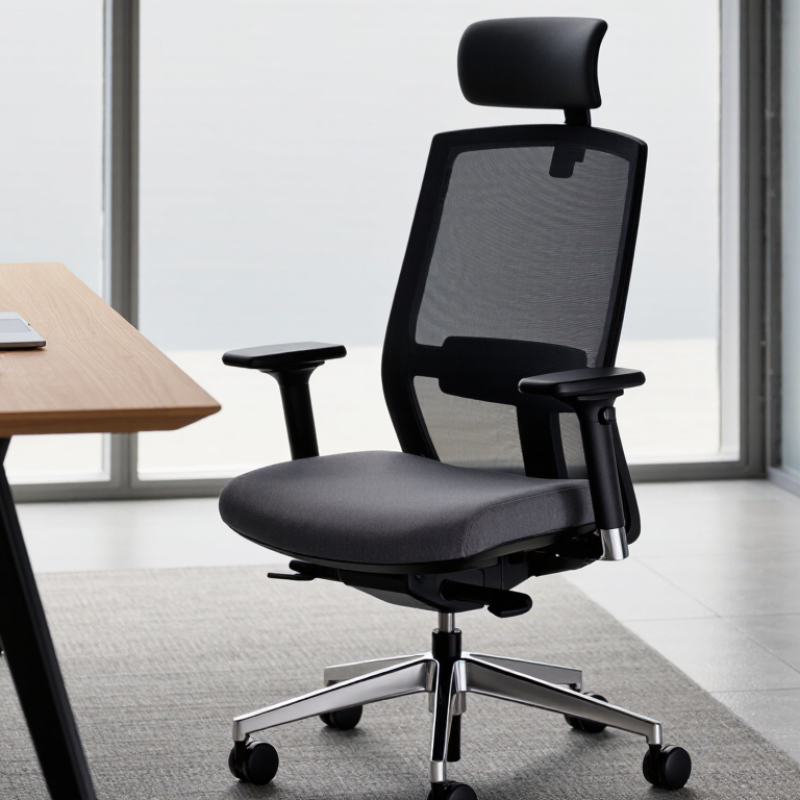
How to Choose the Best High Backed Office Chair?

Define Your Needs and Check for ANSI/BIFMA X5.1 Office-Chair Testing

Before comparing high-backed office chairs, describe your actual workday. Do you lean back during calls, type for hours, or shift between tasks? Measure desk height, seat depth, and clearance behind the chair. A tall back may feel supportive, yet it can press against shelves or limit movement. Small details matter.

Look for adjustable lumbar support, a seat that leaves space behind your knees, and armrests that fit beneath your desk. Try the chair in your usual posture, not only while reclined. Stay seated long enough to notice pressure near your thighs and whether your feet rest flat. Comfort is personal. Testing is not. ANSI/BIFMA X5.1 sets performance tests for general-purpose office chairs, including durability and structural performance. Check whether the exact model has been tested to this standard, and request a report or clear documentation. A broad claim alone does not show which configuration was tested.

A test report cannot tell you whether the backrest suits your height or whether the seat feels comfortable after a full afternoon. Use testing information to assess safety and durability, then judge fit through an actual trial. If possible, adjust the chair at your own desk. It is easy to overvalue a tall back and miss a seat that is too deep. Even careful checks can leave questions; comfort may surprise you after several workdays.

How to Choose the Best High-Backed Office Chair

Define your needs and check for ANSI/BIFMA X5.1 office-chair testing.

The 1–5 ratings are illustrative buyer-priority scores, not measured product data or ANSI/BIFMA test results. Choose a chair that fits your body and work tasks; confirm that any claimed ANSI/BIFMA X5.1 testing applies to the specific chair model.

Match Seat Height to OSHA’s 16–20-Inch Workstation Guidance

For a high-backed office chair, seat height is a practical starting point for comfort, not a feature to overlook. OSHA workstation guidance commonly uses a 16–20-inch seat-height range as a reference. Measure from the floor to the seat surface while sitting, since cushion compression can change the effective height. A tape measure helps, but your posture matters more than matching a number exactly.

Set the chair so both feet rest flat, with knees near hip level and thighs supported. Your shoulders should stay relaxed while your forearms reach the desk. Small details matter. If the seat is too high, dangling feet can press against the seat edge; if it is too low, your knees may rise and your back may round. A footrest can help when the desk height cannot be changed. It may feel like a workaround, and sometimes it is.

A high back should support your upper back without forcing your head forward. Adjust the chair, then sit at your workstation for several minutes and check for pressure behind your knees or tension in your shoulders. The 16–20-inch range will not fit every body, desk, or shoe choice. Treat it as a useful check, then make small adjustments based on how your body sits and moves.

How to Choose the Best High Backed Office Chair? - Match Seat Height to OSHA’s 16–20-Inch Workstation Guidance

Use this checklist to compare chair features and check your seated fit. The 16–20-inch seat-height range is a practical reference, not a fixed OSHA requirement; adjust the chair to your body and workstation.

Dimension Useful target or check What to look for in a high-backed chair
Seat height A practical adjustment range is about 16–20 inches from the floor to the top of the seat. Choose a chair with an adjustable seat height. At your working height, keep your feet supported and your thighs roughly parallel to the floor; use a footrest if needed.
Foot and leg support Feet rest flat on the floor or on a footrest, with knees around hip level and room to move. Check that the chair can be set low enough for comfortable foot support without raising your shoulders to reach the desk.
Seat depth When seated against the backrest, leave a small gap—about 2–4 inches—between the front edge of the seat and the backs of the knees. A sliding seat pan can help accommodate different leg lengths. The seat should support the thighs without pressing behind the knees.
Backrest and lumbar support The backrest should support the back in a comfortable working posture, including the lower-back area. Try the backrest at your desk. A high back should support your upper back without forcing your head forward; adjustable recline or lumbar support can improve fit.
Armrests With shoulders relaxed, forearms should be supported comfortably and elbows should remain close to the body. Adjustable armrests are useful if they fit beneath or alongside the desk and do not prevent you from sitting close to the work surface.
Desk and keyboard alignment Keep wrists generally straight and shoulders relaxed while using the keyboard and mouse. Set the chair and workstation together. If the desk is too high to use comfortably with supported feet, consider adjusting the workstation or using a footrest.
Stability and movement The chair should remain stable during normal seated work and allow you to change posture. Check that the base is stable, controls are easy to reach, and casters suit the floor surface and intended use.

Important: OSHA workstation guidance emphasizes adjustability and a comfortable fit—such as supported feet and a suitable backrest—rather than requiring every worker to use one exact seat height. The best setting depends on your body, footwear, and workstation.

Compare Seat Width and Depth with OSHA’s 17–20- and 15–18-Inch Ranges

When comparing high-backed office chairs, use OSHA’s 17–20-inch seat-width and 15–18-inch seat-depth ranges as starting points, not guarantees of fit. Measure the usable seat area, not the outside frame. Armrests can make a chair feel narrower than its listed width.

Sit centered, with room at each hip but no sliding from side to side. Check the fit in ordinary work clothes; a bulky coat can distort it. For depth, sit against the backrest and leave a few fingers’ space between the seat edge and the backs of your knees. Keep both feet supported. Small details matter.

A seat that is too deep may push you forward and reduce back support. One that is too shallow may leave your thighs unsupported. Adjustable depth can help, but check its full range rather than relying on one measurement. A tape measure helps. Body proportions vary, and a cushion may compress during a long workday. It is easy to focus on the tall back and overlook the seat pan, though that is where fit often becomes obvious.

Evaluate Lumbar Support and Backrest Adjustability for Your Posture

A high-backed office chair should support your natural posture, not force your back into a rigid position. Pay close attention to the lumbar area, where the lower back curves inward. When seated, the support should meet that curve without pressing sharply or leaving a noticeable gap. A useful test is to sit with your feet flat and shoulders relaxed, then adjust the lumbar pad or support height. Small changes matter. If the chair offers adjustable depth, check whether the support feels steady when you lean back.

Backrest adjustability matters just as much. Look for a recline mechanism with tension you can control, plus a lock or range limiter if you prefer a more upright working position. Try several angles rather than judging the chair from one quick sit. Your back should stay supported as you shift, and the backrest should not push your shoulders forward. A chair can feel comfortable for five minutes and become distracting after an hour.

If possible, test the adjustments at your desk, with your usual screen and keyboard height. Notice whether you keep sliding forward or repeatedly repositioning the lumbar support. Those are useful clues, though they do not prove the chair is unsuitable; desk setup and personal preference also affect comfort. The “best” fit may take a little experimenting. That part is easy to underestimate.

Compare Recline, Materials, and Warranty for Long-Term Daily Use

Choosing a high-backed office chair means comparing recline, materials, and warranty—not just headrest height. Look for a backrest that supports your shoulders and a recline mechanism with adjustable tension and a stable lock. A 2019 JAMA analysis of U.S. accelerometer data found adults’ average sedentary time rose from 5.5 hours daily in 2007–08 to 6.4 hours in 2015–16. That makes comfort over several hours worth testing. Small details matter. A showroom sit can mislead; five comfortable minutes may not reveal a firm seat edge by midafternoon.

Materials shape daily upkeep. Breathable mesh can feel cooler, while cushioned fabric may feel softer but hold heat or show wear. Check seams, adjustment handles, and the seat’s return after pressing it. For the warranty, read coverage periods for the frame, upholstery, and moving parts separately. Check exclusions and whether labor or shipping is covered. A long warranty is useful, but it does not guarantee an easy repair.

Tips: Test the recline with your feet flat and shoulders supported. Ask for written warranty terms, then compare them with the parts most likely to wear. If possible, try the chair for a full work session; fit varies, and my first impression would not be enough.